Category: Computer

FreeBSD 10: Installing Apache 2.4, MySQL 5.5, and PHP5.5 — Missing libphp5.so

Continuing my quest with FreeBSD.

Today, I was installing Apache 2.4, MySQL 5.5, and PHP 5.5 (php55-5.5.11) on newly installed system. I've done this kind of installation many times on Linux so I didn't expect much of problems. Boy, I was wrong...

Apache and MySQL installation were straight forward and had no problem. After PHP installation, I couldn't find libphp5.so in /usr/local/libexec/apache24/! A little googling found articles/forums on older version of FAMP. They said its installation should be automatic or "Build Apache module" option needs to be selected, which I did not have such an option any where.

Then one thread mentioned something about configuring php conf file. So, I opened Makefile for PHP55: # vim Makefile ------------------------------------- ... OPTIONS_DEFINE+=APACHE CLI CGI FPM... OPTIONS_DEFAULT=APACHE CLI CGI FPM...

Compiled PHP55 again: # make install config ===> php55-5.5.11 doesn't install the Apache module anymore: update your OPTIONS and build www/mod_php55 port instead. *** Error code 1

Aha! www/mod_php55. I wonder if php installation didn't install mod_php55 but now I know what I need to do: # cd /usr/local/www/mod_php55/ # make install clean ... --- Zend/zend_dtrace_gen.h dtrace: failed to compile script /usr/ports/www/mod_php55/work/php-5.5.11/Zend/zend_dtrace.d: line 30: failed to resolve INP_IPV4: Unknown variable name ...

Hmm... I wonder if this was causing php55 installation to fail creating libphp5.so. Well, another googling found a suggestion/solution to load the dtraceall module: # kldload dtraceall # echo 'dtraceall_load="YES"' >> /boot/loader.conf

Now, mod_php55 was successfully installed as well as libphp5.so!

Here is the whole steps to install apache, mysql, and php:

NOTE: The steps below are not suitable for production use. Be warned!

Disclaimer:
The information in this site is the result of my researches in the Internet and of my experiences. It is solely used for my purpose and may not be suitable for others. I will NOT take any responsibility of end result after following these steps (although I will try to help if you send me your questions/problems).

Apache 2.4 - Installation and Configuration:

# cd /usr/ports/www/apache24/ # make install clean

Edit /etc/rc.conf to make the Apache server will start automatically at system boot. # vim /etc/rc.conf ------------------------------------- apache24_enable="YES"

Test the Apache server installation using the following command: # /usr/local/etc/rc.d/apache24 start

MySQL - Installation and Configuration:

# cd /usr/ports/databases/mysql55-server/ # make install clean

Start MySQL # /usr/local/etc/rc.d/mysql-server onestart

Update /etc/rc.conf # vim /etc/rc.conf ------------------------------------- mysql_enable="YES"

Set root password # rehash # mysqladmin -uroot password '<password>'

Create my.cnf # cp /usr/local/share/mysql/my-small.cnf /etc/my.cnf

Restart mysql # /usr/local/etc/rc.d/mysql-server restart

PHP Installation and Configuration:

Here is the moment of truth. First, load the dtraceall kernel module, update the /boot/loader.conf file, and then install php55. # kldload dtraceall # echo 'dtraceall_load="YES"' >> /boot/loader.conf # cd /usr/ports/lang/php55 # make install clean

Check to see if libphp5.so is there # ls /usr/local/libexec/apache24/ httpd.exp mod_include.so mod_access_compat.so mod_info.so ...

Nope, it's not there. Then manually compile www/mod_php55/ # cd /usr/ports/www/mod_php55/ # make install clean

Now, check to see if libphp5.so is there again # ls /usr/local/libexec/apache24/ httpd.exp mod_include.so libphp5.so mod_info.so ...

Copy the PHP configuration file # cp /usr/local/etc/php.ini-production /usr/local/etc/php.ini

Edit /usr/local/etc/apache24/httpd.conf file and add the following lines # vim /usr/local/etc/apache24/httpd.conf ------------------------------------- AddType application/x-httpd-php .php AddType application/x-httpd-php-source .phps

Add the following line under the LoadModule section if it's not there LoadModule php5_module libexec/apache24/libphp5.so

Edit the DirectoryIndex section DirectoryIndex index.php index.html

Now restart the apache server # /usr/local/etc/rc.d/apache24 restart

Let's see now if it can show a php page # vim /usr/local/www/apache24/data/index.php ------------------------------------- < ?php phpinfo(); ?>

Voilà! It's working now!
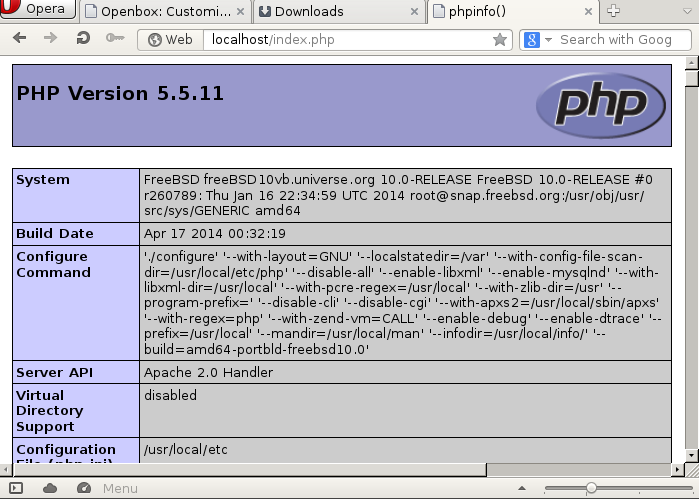
phpinfo

That's all!
-gibb

FreeBSD: Installing VirtualBox — No rule to make target ‘/sys/kern/bus_if.m’ Compile Error

One of the reasons I need VirtualBox on my HP Pavilion laptop is that I need Windows system to access to my work environment. The program only runs on Windows or Mac. I suggested (or rather complained) to make it available for Linux users but to this day my wish hasn't granted.

So let's install VirtualBox from the ports.

Disclaimer:
The information in this site is the result of my researches in the Internet and of my experiences. It is solely used for my purpose and may not be suitable for others. I will NOT take any responsibility of end result after following these steps (although I will try to help if you send me your questions/problems).

As always, check for updates on ports: # ports fetch # portsnap update

Now follow the instruction in the handbook, 21.3. FreeBSD as a Host. # cd /usr/ports/emulators/virtualbox-ose/ # make install clean ... kmk[2]: *** No rule to make target `/sys/kern/bus_if.m', needed by `/usr/ports/emulators/virtualbox-ose/work/VirtualBox-4.3.10_OSE/out/freebsd.amd64/release/obj/FreeBSDGeneratedKernelHeaders/bus_if.h'. Stop. kmk[2]: Leaving directory `/usr/ports/emulators/virtualbox-ose/work/VirtualBox-4.3.10_OSE' kmk[1]: *** [pass_installs_this] Error 2 kmk[1]: Leaving directory `/usr/ports/emulators/virtualbox-ose/work/VirtualBox-4.3.10_OSE' kmk: *** [pass_installs_order] Error 2 *** Error code 2 Stop in /usr/ports/emulators/virtualbox-ose. *** Error code 1 Stop in /usr/ports/emulators/virtualbox-ose.

Huh? Error? Let's see what went wrong.

kmk[2]: *** No rule to make target `/sys/kern/bus_if.m', needed by...

This line seems to be the root cause. It looks like /sys/kern/bus_if.m is missing? Indeed, there is nothing under /sys. Furthermore, /sys is a link to /usr/src/sys which means I'm missing kernel source files? I then downloaded src.txz from the FreeBSD site. # tar -C / -xvf src.txz

Then compile virtualbox again. This time it went through without any errors! Yahoo!

Now follow the rest of the steps in the handbook. Load the kernel module and update /boot/loader.conf to ensure the module gets loaded at each reboot: # kldload vboxdrv # vi /boot/loader.conf ------------------------------------ vboxdrv_load="YES"

For bridged or host-only networking, add the following to /etc/rc.conf and reboot the computer: # vi /etc/rc.conf ------------------------------------ vboxnet_enable="YES"

To use VirtualBox, all users need to be the member of vboxusers: # pw groupmod vboxusers -m <username>

The default permissions for /dev/vboxnetctl are restrictive and need to be changed for bridged networking: # chown root:vboxusers /dev/vboxnetctl # chmod 0660 /dev/vboxnetctl

Update /etc/devfs.conf to make above change permanent: # vi /etc/devfs.conf ------------------------------------ own vboxnetctl root:vboxusers perm vboxnetctl 0660

Finally, type VirtualBox in a terminal to launch it: $ VirtualBox &

That's all!
-gibb

FreeBSD 10: linux_base-f10-10_7 linuxulator is not (kld) loaded error

On the other day, I was trying to install Adobe Flash plugin support for opera by following the FreeBSD handbook. It says:

To install Adobe® Flash® plugin support, first compile the www/linux-f10-flashplugin11 port, as a package is not available due to licensing restrictions. Then install either the www/opera-linuxplugins port or package. This example compiles both applications from ports: # cd /usr/ports/www/linux-f10-flashplugin11 # make install clean # cd /usr/ports/www/opera-linuxplugins # make install clean

So I followed above example and typed make install clean for linux-f10-flashplugin11. Then I got below error: ... Linux_base-f10-10_7 linuxulator is not (kld)loaded. *** [install] Error code 1...

Huh? Being a FreeBSD novice, I got a bit confused because this chapter (7.2.2. Opera) in the handbook didn't mention anything about loading linux kernel module.

But a little googling came to rescue!

Apparently, I needed to load the linux.ko module before installing those ports (found out in chapter 11.2. Configuring Linux® Binary Compatibility):

To load the linux.ko module: # kldload linux

To verify: # kldstat Id Refs Address Size Name 1 11 0xffffffff80200000 15f0310 kernel 2 1 0xffffffff817f1000 20400 geom_eli.ko 3 2 0xffffffff81812000 34ed0 crypto.ko 4 1 0xffffffff81a12000 432d4 linux.ko

After this, compiling for linux-f10-flashplugin11 and opera-linuxplugins went smoothly.

Disclaimer:
The information in this site is the result of my researches in the Internet and of my experiences. It is solely used for my purpose and may not be suitable for others. I will NOT take any responsibility of end result after following these steps (although I will try to help if you send me your questions/problems).

That's all!
-gibb

FreeBSD 10 with Full Disk Encryption on UFS Filesystem

Since its release on 1/20/2014, I have been trying to install FreeBSD 10 on my HP Pavilion dm3-1130us notebook with ZFS because I wanted to utilize its full disk encryption; however, every time I try, it failed during the boot process with the following messages: gptzfsboot: error 66 lba 48 gptzfsboot: error 66 lba 1 gptzfsboot: No ZFS pools located, can't boot

I googled but couldn't find any solutions even now. If anyone knows how to resolve this, I'm all ears.

Disclaimer:
The information in this site is the result of my researches in the Internet and of my experiences. It is solely used for my purpose and may not be suitable for others. I will NOT take any responsibility of end result after following these steps (although I will try to help if you send me your questions/problems).

So for now, I'm going to install it with full disk encryption on UFS instead. After many trial and errors, I found steps that worked on my system (thanks to BSD Now). I'll just list commands below just in case the site becomes unavailable in the future (it happens!).

Installation:

Follow the installation until the partition menu. Choose shell to manually configure the disk encryption before the OS is installed.

To view a list of disk devices, run: # sysctl kern.disks

With a blank disk, run: # gpart create -s gpt ada0

Or destroy existing one: # gpart destroy -F ada0

Create 3 partitions. The first is for the boot record, the second is an unencrypted /boot partition (from which the kernel is loaded) and the third is the large encrypted partition for the rest of the OS and files. # gpart add -t freebsd-boot -s 512k -a 4k ada0 # gpart add -t freebsd-ufs -l bootfs -s 1g -a 1m ada0 # gpart add -t freebsd-ufs -l encrypted -a 1m ada0

Install the bootcode: # gpart bootcode -b /boot/pmbr -p /boot/gptboot -i 1 ada0

Encrypt the partition: # geli init -b -s 4096 ada0p3 Enter passphrase: Reenter passphrase:

Attach the device: # geli attach ada0p3 Enter passphrase: cryptosoft0: on motherboard GEOM_ELI: Device ada0p3.eli created GEOM_ELI: Encryption: AES-XTS 128 GEOM_ELI: Crypto: software

Format the partitions: # newfs -U /dev/ada0p2 # newfs -U /dev/ada0p3.eli

Mount the partitions: # mount /dev/ada0p3.eli /mnt # mkdir /mnt/unenc # mount /dev/ada0p2 /mnt/unenc # mkdir /mnt/unenc/boot # ln -s unenc/boot /mnt/boot

Create the fstab file: # vi /tmp/bsdinstall_etc/fstab ---------------------------------------------------- # Device Mountpoint FStype Options Dump Pass# /dev/ada0p2 /unenc ufs rw,noatime 1 1 /dev/ada0p3.eli / ufs rw,noatime 2 2

Automatically load the kernel modules that are required for booting from an encrypted volume: # vi /tmp/bsdinstall_boot/loader.conf ---------------------------------------------------- geom_eli_load="YES" vfs.root.mountfrom="ufs:ada0p3.eli"

Exit out and follow the rest of installation. After rebooting, it should prompt for passphrase.

However, on my system there was a bit of gotcha after the reboot: FreeBSD10_encryption

As you might see in above image, some kernel messages followed right after the passphrase prompt. I did not realize this for a while and made me think that the encryption failed (and it took me a while to figure out...). To confirm the encryption is working, press Enter. The passphrase prompt shows up again: GEOM_ELI: Wrong key for ada0p3. Tries left: 2. Enter passphrase for ada0p3:

That's all!
-gibb

A Happy New Year!

This is the first blog entry in 2014.

I can't believe another year past already. 2013 was busy year for me personally and non-personally. Well, if it's busy and got many things done, it would have been good and productive busy, but unfortunately, I was *just* busy and left many things undone in my laundry list. Hopefully, I can get some of them done in 2014.

To my big (and good) surprise, there were readers to my blog and they have left me such encouraging comments! This was not expected. Originally my intention of this blog was for notes to myself. But I'm very happy to hear that some of my notes have helped some readers. I hope I can keep up with their expectations!!

Well, I wish everyone a happy, peaceful, prosperous and productive new year!

That's all!
-gibb